[
    {
        "id": "c922134c774ca695",
        "type": "function",
        "z": "98eecb7bb5dbbaf0",
        "g": "102a7c3090fc21bc",
        "name": "PrepareNotification",
        "func": "msg.firstArtistString = msg.payload.item.artists[0].name;\nmsg.image = msg.payload.item.album.images[2].url;\nmsg.artistsString = \"\";\nfor (var i = 0; i < msg.payload.item.artists.length; i++) {\n    if(i>0){\n        msg.artistsString = msg.artistsString + \", \";\n    }\n    msg.artistsString = msg.artistsString + msg.payload.item.artists[i].name;\n}\nmsg.trackString = msg.payload.item.name;\nmsg.albumString = msg.payload.item.album.name;\nmsg.albumTrimmedString = msg.albumString.split('(')[0];\nmsg.playedTrack = msg.artistsString + \" - \" + msg.trackString;\n\nmsg.payload = { \"Artist\": msg.artistsString,  \"Track\": msg.trackString, \"Album\": msg.albumTrimmedString, \"img\": msg.image};\n\nreturn msg;",
        "outputs": 1,
        "timeout": "",
        "noerr": 0,
        "initialize": "",
        "finalize": "",
        "libs": [],
        "x": 650,
        "y": 460,
        "wires": [
            [
                "c6a34ecdba7bc5e2"
            ]
        ]
    },
    {
        "id": "c6a34ecdba7bc5e2",
        "type": "rbe",
        "z": "98eecb7bb5dbbaf0",
        "g": "102a7c3090fc21bc",
        "name": "",
        "func": "rbe",
        "gap": "",
        "start": "",
        "inout": "out",
        "septopics": false,
        "property": "playedTrack",
        "topi": "topic",
        "x": 810,
        "y": 460,
        "wires": [
            [
                "d4ce183cbf8b447e"
            ]
        ]
    },
    {
        "id": "d4ce183cbf8b447e",
        "type": "http request",
        "z": "98eecb7bb5dbbaf0",
        "g": "102a7c3090fc21bc",
        "name": "willifixnet",
        "method": "POST",
        "ret": "txt",
        "paytoqs": "ignore",
        "url": "https://willifix.net/spotiplay",
        "tls": "",
        "persist": false,
        "proxy": "",
        "insecureHTTPParser": false,
        "authType": "",
        "senderr": false,
        "headers": [
            {
                "keyType": "Content-Type",
                "keyValue": "",
                "valueType": "other",
                "valueValue": "application/json"
            },
            {
                "keyType": "other",
                "keyValue": "Spotiplay-Secret",
                "valueType": "other",
                "valueValue": "changeme"
            }
        ],
        "x": 940,
        "y": 460,
        "wires": [
            []
        ],
        "icon": "font-awesome/fa-align-left"
    }
]spotiplay plugin in action:
Please look for the new version which no longer requires Node-RED and is therefore easier to use https://willifix.net/blog/spotiplay-withouth-nodered!
Introduction
Some time ago, I purchased an ULANZ TC001. After successfully flashing the awtrix firmware, I quickly realized the potential of this little tool.
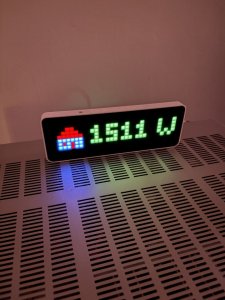
After trying it out a bit, I got familiar with the excellent API. Currently, the following is displayed on the awtrix using iobroker:
- the current power consumption of the house
- the current output of the PV system
- the current battery charge level
- which song is currently playing on Spotify
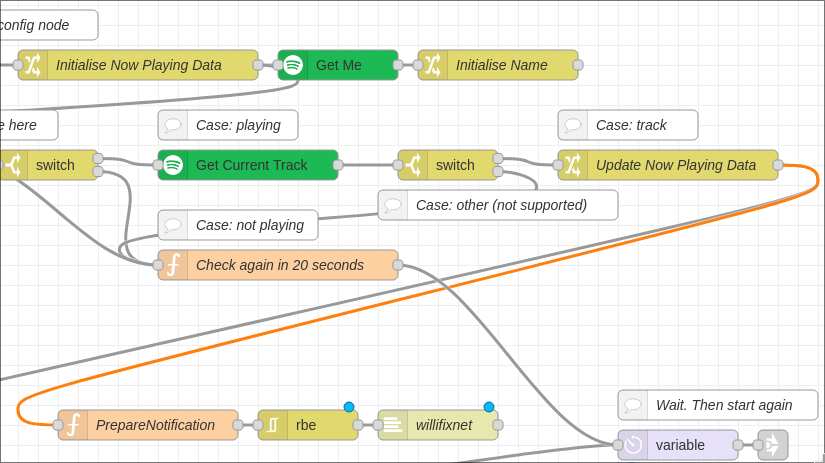
And that's why I'm starting with this overview of the Ulanzi and the awtrix firmware, because someone has created a Nodered Flow for this device that helps me get the necessary data via the Spotify API.
get spotify API Access and form the json with Node-Red
I get the information from spotify via a Node-Red flow. The flow and the necessary setup on Spotify's side are explained here. https://g.willifix.net/02taB
after successfull setup you can simply add a http request node that points to the endpoint of my plugin!
here is the export of the node-red function to create the needed json and send it to endpoint of my plugin.
this needs to be connected to Update Now Playing Data
Install the Plugin
- Download my plugin here: spotiplay.zip | Grav2 spotiplay2.zip
- In Grav Admin Navigate to Tools -> Direct Install and upload the ZIP File.
- Configure the Spotiplay-Secret in the settings of the plugin.
Set the same Secret in the http-request node (headerfield Spotiplay-Secret) - The Plugin should now be ready. check this with
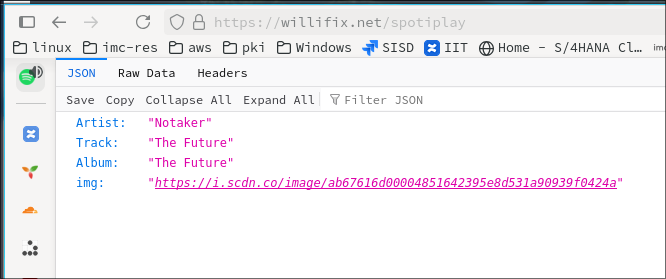
https://your-site.xxx/spotiplayif you get a anwswer the plugin is ready to accept data
If the plugin has already received data, it displays the received data accordingly at the endpoint.
Publish the currently listening element
As a final step, you can now insert the following text on one of your pages to get the box I showed above:
if you use grav2 simple use the shortcode spotiplay
<table border="1">
<tr>
<th colspan="2" align="left" style='font-size: 10px;'>currently listening:</th>
</tr>
<tr>
    <td style='valign: center;'>
        <img src="{{ spotiplay('img') }}">
    </td>
    <td style='padding: 10px; text-align: center; font-size: 10px;'>
        {{ spotiplay('Artist') }}<br>
        {{ spotiplay('Track') }}
    </td>
</tr>
</table>
<br>
to get JIT Updates enable Never Cache Twig in the Advanced Settings of the page that shows the spotiplay box.
